National Parks: Passport Guide
- 3.9
- Rating
- 10.00K
- Installs
- Free
- Price

 Analysis by App-foxy
Planning a national park trip often starts with scattered notes: a park name saved in a map app, a campsite page open in the browser, and a growing list of places you hope to visit someday. National Parks: Passport Guide takes a more focused approach. It is a travel and local app from Code200 built around the idea of keeping your park visits together, while also helping you prepare for the next one. After spending time with it, I see its main value in the way it turns a broad collection of parks into a personal travel record rather than just another map.
The app is free to download and aimed at everyone, so it is easy to try without making a large commitment. It has a 3.9 average from around 66 ratings and more than 10 thousand installs, which suggests a modest but established user base rather than a huge travel platform. Its current version is 1.32.0, and it runs on Android 6.0 or later. In-app purchases range from $1.99 to $6.99 per item, so I would look at the available extras before assuming every part of the experience is included.
A digital passport that makes park visits feel connected
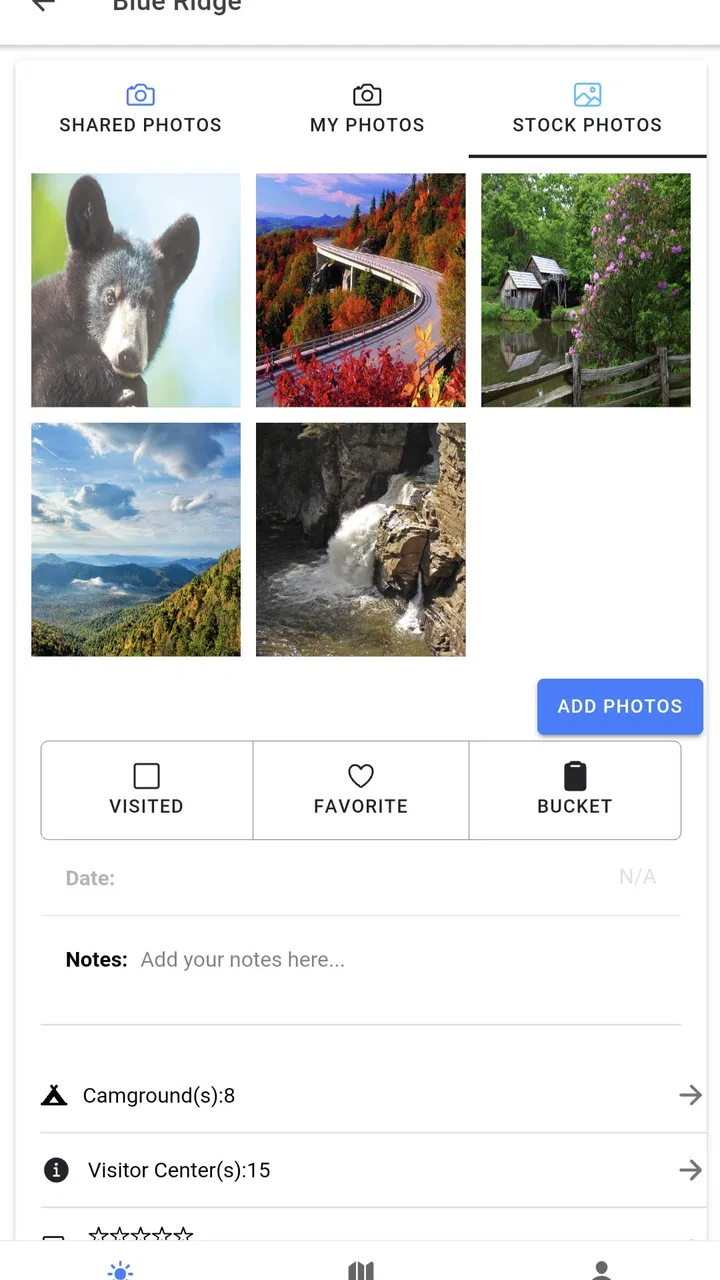
The defining capability is the digital national parks passport. Instead of treating each trip as a separate search, the app gives you a place to track the parks you have visited and use that history when planning future outings. That sounds simple, but it changes how the app feels. A normal map is excellent for finding a route or checking what is nearby; it is less useful for remembering which parks you have already explored and which ones still belong on your list.
You May Also Like

 Blood Strike: 2.5 Anniversary
Blood Strike’s Loadouts Turn Every Drop Into a Tactical Gamble
A close look at Blood Strike’s custom loadouts: how fast access to signature weapons reshapes its battle royale rhythm, rewards preparation, and narrows the gap between fights.

 Pandora - Music & Podcasts
Pandora’s Music Is Easy to Start, but Harder to Recover
Pandora’s strength is its low-effort path from a seed to a station. Its weak spot is how much confidence it asks you to place in connection, setup, and quiet recovery.

 8 Ball Pool
8 Ball Pool Is Built on Rivalries, Rematches, and Routine
A close look at the rivalries, rematches, shared routines, and unanswered safety questions that turn a quick pool match into a persistent mobile community.

 Samsung Music
Samsung Music’s Quiet Strength Is Playing What You Already Own
Its reach comes less from spectacle than from dependable access to a personal library. That simplicity is both the app’s strongest retention engine and its ceiling.

 AccuWeather: Weather Radar
AccuWeather Review: A Quick, Clear Forecast for Everyday Decisions
For everyday plans, the best forecast is the one you can understand quickly. AccuWeather makes rain timing, radar, and local conditions easy to act on, with a few trade-offs.

 Hill Climb Racing
Why Hill Climb Racing Still Turns Crashes Into One More Run
A tiny car, a bumpy hill and one more upgrade: Hill Climb Racing keeps resurfacing because its simple chaos makes every near-miss feel personal.
More From Our News Desk
View All News


I found the passport idea most useful as a planning anchor. When I think about a future road trip, I can begin with the parks themselves rather than with a blank map. The record of past visits helps separate familiar destinations from new possibilities, and that makes it easier to build a trip around personal goals. Someone collecting visits across several journeys can use the app as a lightweight travel journal, while a first-time visitor can use it to turn an intimidating list of destinations into a manageable plan.
The important distinction is that this is not simply a general travel search tool with a national park label attached. Its purpose is narrower and more personal. The value comes from combining park information, visit tracking, trip preparation, and campsite discovery in one place. The passport is most useful when you return to it between trips, not just when you open it once to look up a park.
Why visit tracking matters more than it first appears
Visit tracking can be surprisingly practical for travelers who take several shorter trips instead of one major vacation. If I visit a park during a weekend drive, I may remember the broad destination but forget the order of places I stopped or which parks I still want to see nearby. A dedicated record gives those memories a structure. It also helps when planning a repeat trip: I can start by identifying what I have already done and avoid building an itinerary around the same stop by accident.
There is also a motivational side. A growing passport can make a long-term travel project feel tangible without turning it into a competitive challenge. Families may enjoy looking back at the parks they visited together, and frequent road trippers can use the record to shape future routes. I would not treat it as a formal travel log with detailed writing, photographs, or expense tracking, but it works well as a simple marker of progress.
Using the app before leaving home
Before a trip, I would use National Parks: Passport Guide in three passes. First, I would browse the parks that fit the general region or route I am considering. Second, I would read the available information for the specific destinations rather than relying only on the park name. Third, I would check campsite options and compare them with the actual driving plan. This order matters because it prevents the campsite search from deciding the entire trip before I know which parks I genuinely want to visit.
A useful habit is to make a rough route outside the app first, then use the app to refine it. This keeps the passport from becoming a substitute for practical navigation. A park may look close on a broad map but still require a large detour, a separate entrance, or more time than expected. The app can help organize the destinations, while a dedicated navigation service remains better for live directions and road conditions.
I also recommend marking intended destinations mentally as a separate category from completed visits. A planning list is not the same as a travel history. If you use the passport as both, be careful not to treat a saved possibility as proof that you actually visited. That small distinction keeps the record meaningful over time.
A realistic weekend road-trip workflow
Imagine I have a long weekend and want to drive toward a region with several national parks. On the first evening, I would open the app to identify which parks fit the direction of travel and read the basic information attached to them. I would then narrow the choice to two or three destinations instead of trying to cover everything. After that, I would investigate campsites and decide whether the route works better as a single base camp or as a series of overnight stops.
The next step would be checking the plan against reality: driving time, opening arrangements, meal stops, fuel, weather, and the amount of daylight available. The app helps with the park-centered part of that process, but I would still use a regular navigation app and official park resources for time-sensitive details. Once the trip is over, I would return to the passport and record the visits while the details are still fresh.
This workflow shows where the app earns its place. It is not trying to replace every travel tool on the phone. It acts more like a dedicated layer for national park discovery and personal history. That focused role is a strength, provided you are comfortable switching to other tools for navigation and final logistical checks.
Finding campsites without letting them dominate the plan
The campsite information is especially useful at the beginning of planning, when I want to know whether a park can support the kind of trip I have in mind. It gives the park search a practical direction: instead of asking only “What can I see here?”, I can also ask “Can I realistically stay near this destination?” That is a better starting point for multi-day travel than a list of attractions alone.
At the same time, campsite information should be treated as a planning aid rather than the final word. Availability and operating conditions can change, and a campsite that appears suitable may not match the needs of a family, a large vehicle, or someone who requires particular facilities. I would verify important arrangements through current official sources before leaving. The app is valuable for narrowing choices; it should not be the only source I trust for a reservation or a last-minute change.
One non-obvious advantage is that campsite browsing can expose a poor itinerary early. If the only practical overnight option is far from the park area I want to explore, I may decide to shorten the visit, choose another destination, or make the park a day stop. That kind of adjustment is easier before the trip than after arriving tired and discovering that the original plan was too ambitious.
Where it differs from ordinary maps and travel apps
Google Maps and similar navigation apps remain better for turn-by-turn directions, traffic, fuel stops, and broad accommodation searches. General travel apps are often stronger for hotels, restaurants, reviews, and booking workflows. A browser search can also provide more current detail when I need an official alert or a precise rule. National Parks: Passport Guide does not need to beat those tools at their own jobs.
Its advantage is concentration. A general map can show a park, but it usually does not feel like a personal collection of visited destinations. A booking service can show lodging, but it does not naturally connect that search to a long-term park passport. This app brings those pieces closer together for one specific kind of traveler. If your trips rarely involve national parks, that focus may feel restrictive. If national parks are a recurring part of your travel, the narrower design is exactly what makes it useful.
The friction points I noticed
The first limitation is that a digital passport is only as helpful as the effort you put into maintaining it. If I forget to update my visits, the record quickly becomes incomplete and loses some of its planning value. People who prefer a completely automatic travel history may find this approach less satisfying than an app that continuously logs locations, although automatic tracking can bring its own privacy and battery concerns.
The second issue is that the app should not be mistaken for a complete trip-management system. It can help me think about parks and campsites, but I still need other tools for navigation, reservations, detailed weather, road closures, and current operational notices. That is not a flaw in the passport concept, but it is an important boundary. A traveler who wants one app to handle every part of a complex expedition may be disappointed.
The presence of in-app purchases also deserves attention. The app itself is free, while individual purchases fall between $1.99 and $6.99. I would explore the free experience first and only pay for an extra if it directly improves the way I plan or record trips. For a casual visitor making one park trip, the additional cost may not feel necessary. For someone building a long-running collection, a useful paid feature could be easier to justify.
The rating of 3.9 from around 66 ratings gives a reasonable but not overwhelming signal. I would read that as “worth trying with realistic expectations,” not as proof that it will suit every traveler. The relatively small number of ratings also means I would judge the app by my own workflow: whether the park information is convenient, whether the passport is pleasant to maintain, and whether the campsite details save me time.
Who will get the most from it
This app makes the most sense for people who visit national parks repeatedly, plan road trips around outdoor destinations, or enjoy keeping a record of places they have explored. It is also a good fit for families who want a shared sense of progress and for travelers who prefer planning several modest trips over time. The passport gives those separate journeys a common thread.
It can help a new visitor too, especially someone who feels overwhelmed by the number of possible destinations. Starting with a focused park list is less distracting than searching the entire internet for “things to do” and then trying to assemble a trip from unrelated pages. The campsite angle is useful for anyone deciding whether a destination works as an overnight stop rather than merely as a point on a map.
I would skip it if my travel is mostly urban, international, or centered on hotels and restaurants. I would also look elsewhere if I need detailed offline navigation, live alerts, booking management, or a richly written personal journal. In those cases, a combination of a map service, official park information, and a reservation platform will probably serve me better. The app is not a universal travel companion, and its focused purpose should be treated as a feature rather than a promise of total coverage.
My practical recommendation
I recommend trying National Parks: Passport Guide if you want a dedicated record of national park visits and prefer to plan future trips around that collection. I would begin with a real upcoming journey rather than trying to catalog every possible destination immediately. Browse a few parks, examine the campsite information, compare the options with your route, and then see whether returning to the passport feels useful.
For me, the strongest reason to keep it installed is continuity. A normal map helps me get somewhere today; this app helps connect today’s park visit with the next trip I may take months from now. That is a modest but meaningful difference. The experience is best when I use it alongside navigation and official sources, not instead of them.
National Parks: Passport Guide is a free Travel & Local app for everyone, developed by Code200, with support for Android 6.0 and newer devices. Its current version is 1.32.0, and it has passed 10 thousand installs. Those details make it easy to test without much risk. If your travel plans repeatedly return to national parks, the digital passport can become a genuinely useful habit; if you only need directions or bookings, a broader travel app will likely be the better choice.
FAQs for National Parks: Passport Guide
01What is National Parks: Passport Guide?
National Parks: Passport Guide is a travel companion designed for people exploring U.S. national parks. It helps users discover park information, keep track of visited locations, and organize memorable trips in one place. Depending on the version and available features, it may include park details, maps, checklists, passport-style tracking, and useful planning resources for outdoor adventures.
02Does National Parks: Passport Guide work offline?
Offline availability can vary by feature and app version. Basic saved information may remain accessible without an internet connection, but live maps, updated park notices, directions, and other online content may require mobile data or Wi-Fi. Before entering a remote area, it is best to open the parks you plan to visit, save important details, and download any available offline resources in advance.
03Can I use the app to track the national parks I have visited?
Yes, tracking visited parks is one of the most useful reasons to use National Parks: Passport Guide. The app is intended to help travelers maintain a personal record of their national park experiences, making it easier to see completed visits and identify future destinations. Users should still confirm that their progress is saved correctly, particularly after reinstalling the app or changing devices.
04Does the app provide official information about park conditions, closures, and regulations?
The app may provide helpful park descriptions, planning information, and general visitor guidance, but users should not rely on it as the only source for safety-critical updates. Conditions, road closures, entrance rules, permits, weather, and emergency notices can change quickly. Always check the official National Park Service website or contact the relevant park before traveling, especially for remote or seasonal destinations.
05Is National Parks: Passport Guide free to download and use?
The download and available features depend on the current Android or iOS listing. Some functions may be free, while additional tools, premium content, advertising removal, or optional purchases may be offered inside the app. Review the store page and in-app purchase details before downloading so you understand any costs, supported devices, privacy requirements, and subscription terms that may apply.
Pros
- Covers many U.S. national parks in one convenient guide.
- Useful park details help with planning visits and activities.
- Passport-style features make exploring parks more engaging.
- Can inspire trips to lesser-known parks and landmarks.
- Simple format makes information easy to browse on the go.
Cons
- Coverage may be less useful for parks outside the United States.
- Some information may become outdated as park conditions change.
- Detailed trip planning may require additional maps or official sources.
- Content can feel limited for experienced national park travelers.
- Offline access may not include every guide feature or update.

National Parks: Passport Guide
Gallery